
Back
NxtWave • 2023 2024
Coding Practice Platform - Improving Learning Flow & Engagement
Role:
Product Designer
Timeline:
Apr - May, 2023
Team:
1 Product Designer, 1 Product Manager
Problem Statement
The coding practice platform faced two key challenges.
Usability Issues in the Core Experience
A heuristic evaluation revealed several usability problems:
Inconsistent navigation patterns
Too many competing actions (Run, Debug, Save, Reset)
Cluttered interface increasing cognitive load
Unclear task flow between reading, solving, and submitting
These issues made the experience harder than necessary, slowing down learners and reducing engagement.
Tutorial Over-Dependency
User interviews showed that when students got stuck on a coding problem, many of them immediately switched to the “Tutorial” tab instead of attempting to solve the question independently.
There were no friction points or learning nudges to:
Encourage problem-solving effort
Delay instant access to solutions
Support productive struggle
As a result:
Students skipped critical thinking
Learning depth decreased
Platform engagement became passive rather than skill-building
product goals
Improve Learning Flow & Usability
Create a clear, low-friction coding experience that helps students focus on problem-solving instead of figuring out the interface.
This includes:
Reducing cognitive load
Simplifying navigation and actions
Creating a structured learning flow
Improving task clarity and progress visibility
Success Indicators:
Higher session completion rate
Faster task completion
Reduced navigation errors
Improved user satisfaction scores
Encourage Independent Problem-Solving & Scalable Learning
Design the platform to promote active learning and reduce instant tutorial dependency, while minimizing mentor overload.
This includes:
Encouraging productive struggle before revealing solutions
Reducing immediate tutorial access behavior
Supporting self-guided learning
Lowering repetitive mentor queries
Success Indicators:
Increased time spent attempting problems before viewing tutorials
Higher independent submission rates
Reduced repeated mentor doubts
Improved learner confidence
Target Users
Primary Users
The platform’s existing experience optimised for content volume rather than learning momentum, resulting in:
University students, early-career developers and career switchers (India , 18–35)
Preparing for technical interviews (startup roles)
Moderate coding knowledge, low tolerance for friction
Secondary Users
Mentors / instructors
Overloaded with repetitive queries
Needed scalable ways to support learners without 1:1 dependency
Research Methods
Heuristic evaluation of the existing platform
1:1 user interviews (students & mentors)
Survey responses from active users
Usability Issues
Fixing Usability Issues in the Core Experience
To start, I performed Jacob's heuristic evaluation as a means to examine the usability issues.
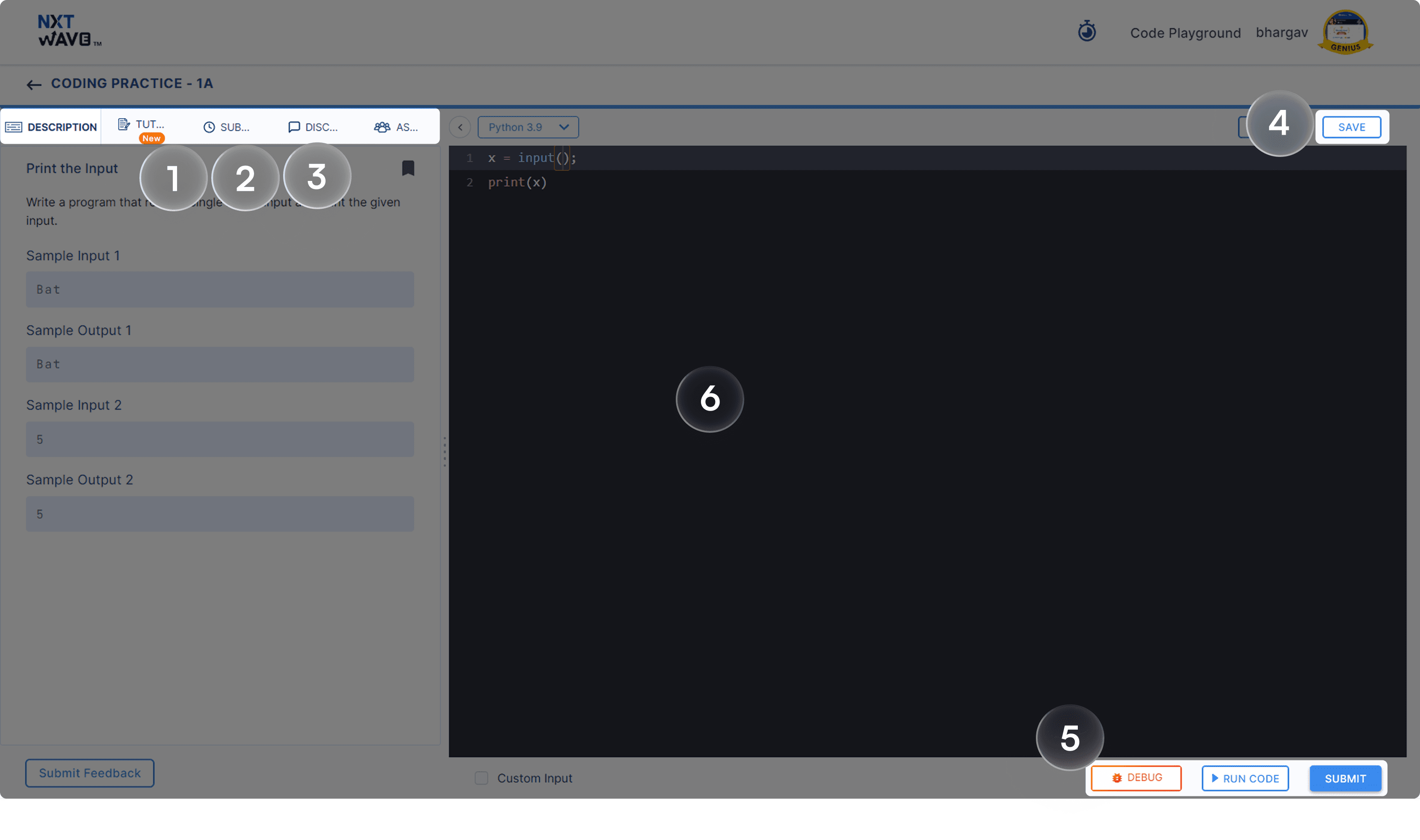
1
Truncation of navigation Tab
The Navigation Bar is truncated, making it challenging for students to discern their current tab.
2
Inconsistent Icons
The icons within the Navigation Tabs lack consistency, with some being simple outline icons and others featuring more detailed line designs.
3
Incorrect Tab Sequence
The current sequence of Navigation Tabs is not ideal, as it encourages users to view the tutorial before attempting the question, whereas we want them to engage with the question first.
4
Saving manually
Manual saving is considered traditional; automatic saving, on the other hand, assists students in saving time and safeguards their data, even in exceptional circumstances.
5
Button Factory
The screen is crowded with buttons, each vying for attention at various locations. The crucial Language selector button, for instance, is playing hide-and-seek with our eyes due to its sneaky placement.
6
Inconsistent Portal design
The current screen does not align with NxtWave's Portal Design standards.
COMPETITIVE AND COMPARATIVE ANALYSIS
Learning from Competitor’s Strategies



I conducted a thorough evaluation of various platforms, including Geeks for Geeks, Coding Ninja, InterviewBit, CodeChef, and HackerEarth to assess how they functioned for my needs.

Observations for fixing usability issues
From my research, I've identified some interesting features which increases user interactions
Detailed explanation
Highlighting sample 1 and 2
Note
Hints - unlock button
Video solution
Test cases
Language selection
Share the problem
Solution in different languages in the form of tabs
Suggest edits in the question
Difficult level filters
Success rate
Average time to solve the problem
Upvote options
Observations in general
Strong platforms emphasise progressive difficulty and instant feedback
Clear milestones outperform generic dashboards
Community-driven doubt resolution scales better than mentor-only models
Gap Identified
No platform balanced structured learning paths + fast doubt resolution + reduced cognitive load effectively
Interviewing and surveying users
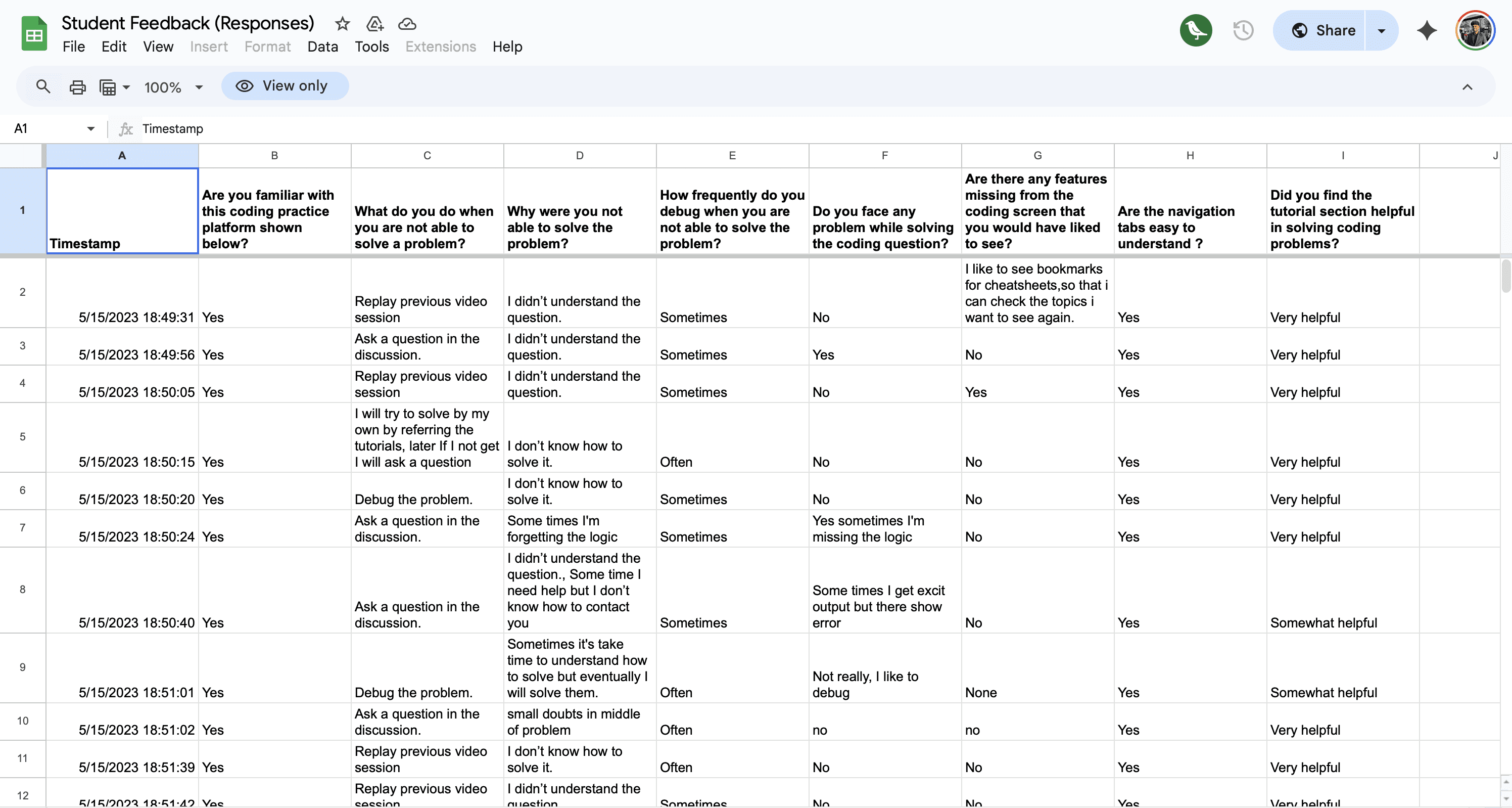
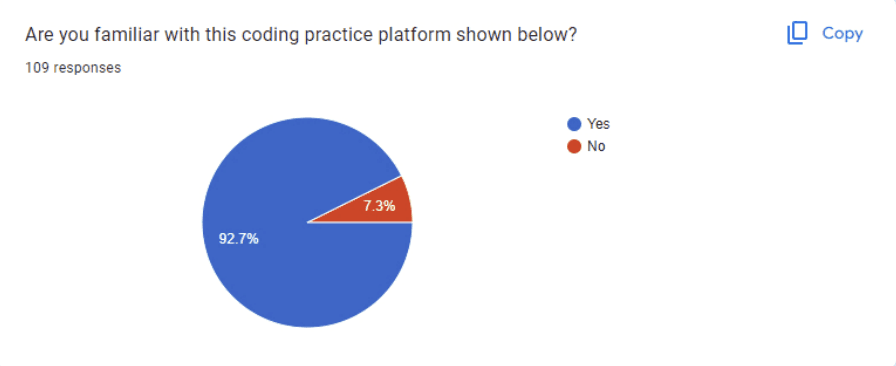
Following the completion of competitor research, I conducted user interviews, surveys, and usability testing to gain insights into user behavior. This helped me understand how users are attempting to address a particular problem and identify the key challenges they encounter while using the coding screen.
User Buckets:
Users who are on time of current growth Cycle after 2 months.
Users who are delayed from their current growth Cycle after 2 months.
Top most Students who clicked most on the Tutorial Tab.
Users who solved very less coding questions in current growth cycle.
user interview
User Interview Highlights
Themes + Insights
I have divided the insights from the survey into 3 themes.
Theme 1:
Challenges Faced by Students in Coding
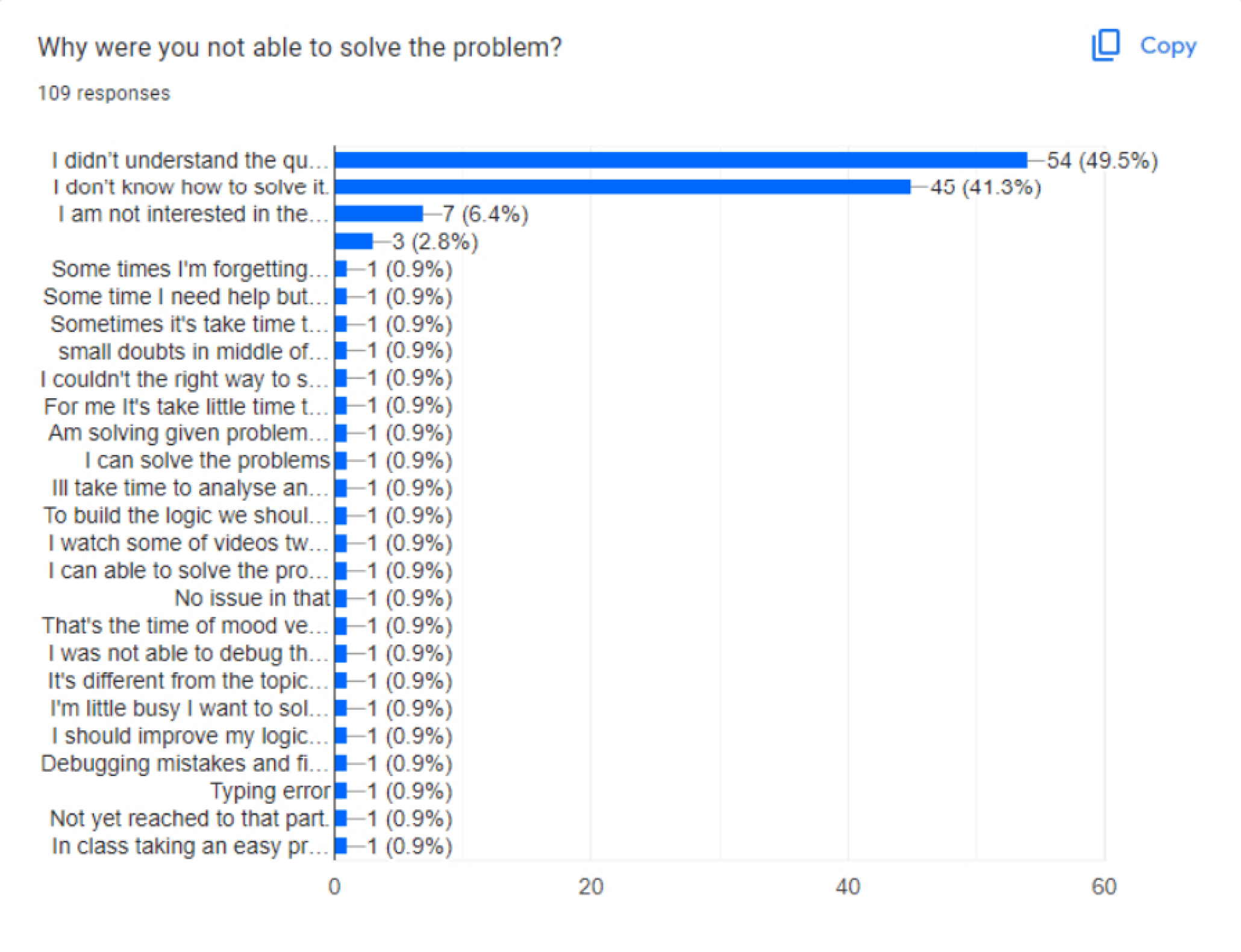
Roughly 50% of students faced challenges in comprehending the questions.
41% of students expressed a lack of knowledge on how to tackle the questions.
Occasionally, students struggle to grasp the question and seek clarification from someone who can provide examples and a step-by-step explanation.
Theme 2:
Student Strategies for Solving Coding Challenges
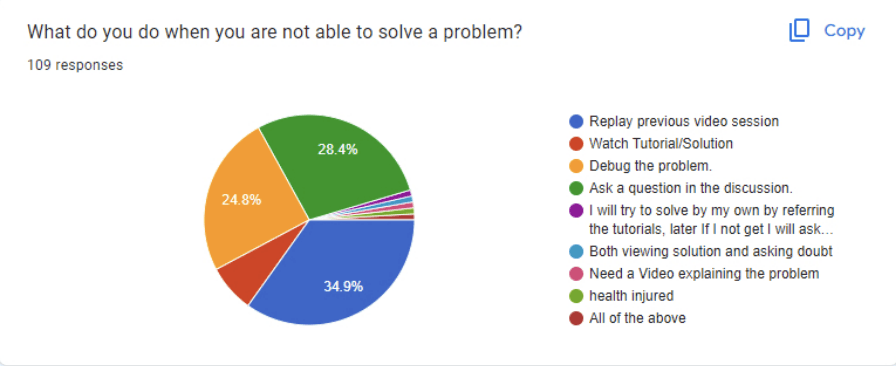
35% of students opted to review previous video sessions.
28% of students engaged by asking questions in the discussion.
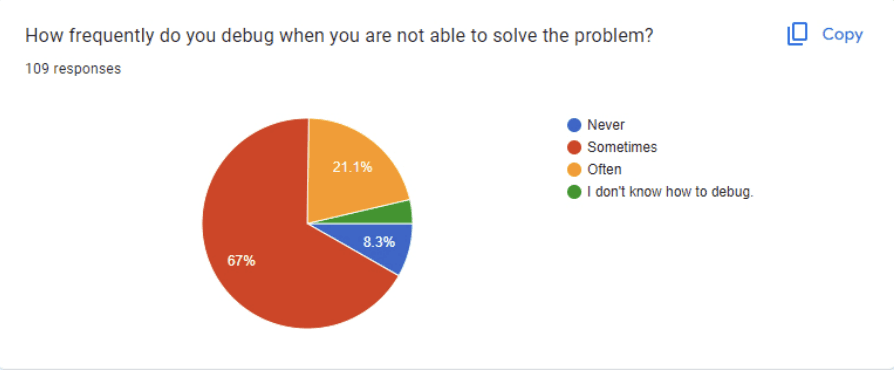
25% of students chose to debug the problem when confronted with challenges in solving a particular question.
Theme 3:
Limitations of Current Learning Resources
Users inquiries in the discussion forum sometimes go unanswered for 24 hours.
Here’s the link to survey and Interview
CODING PRACTICE NEW DESIGN
New vs Old
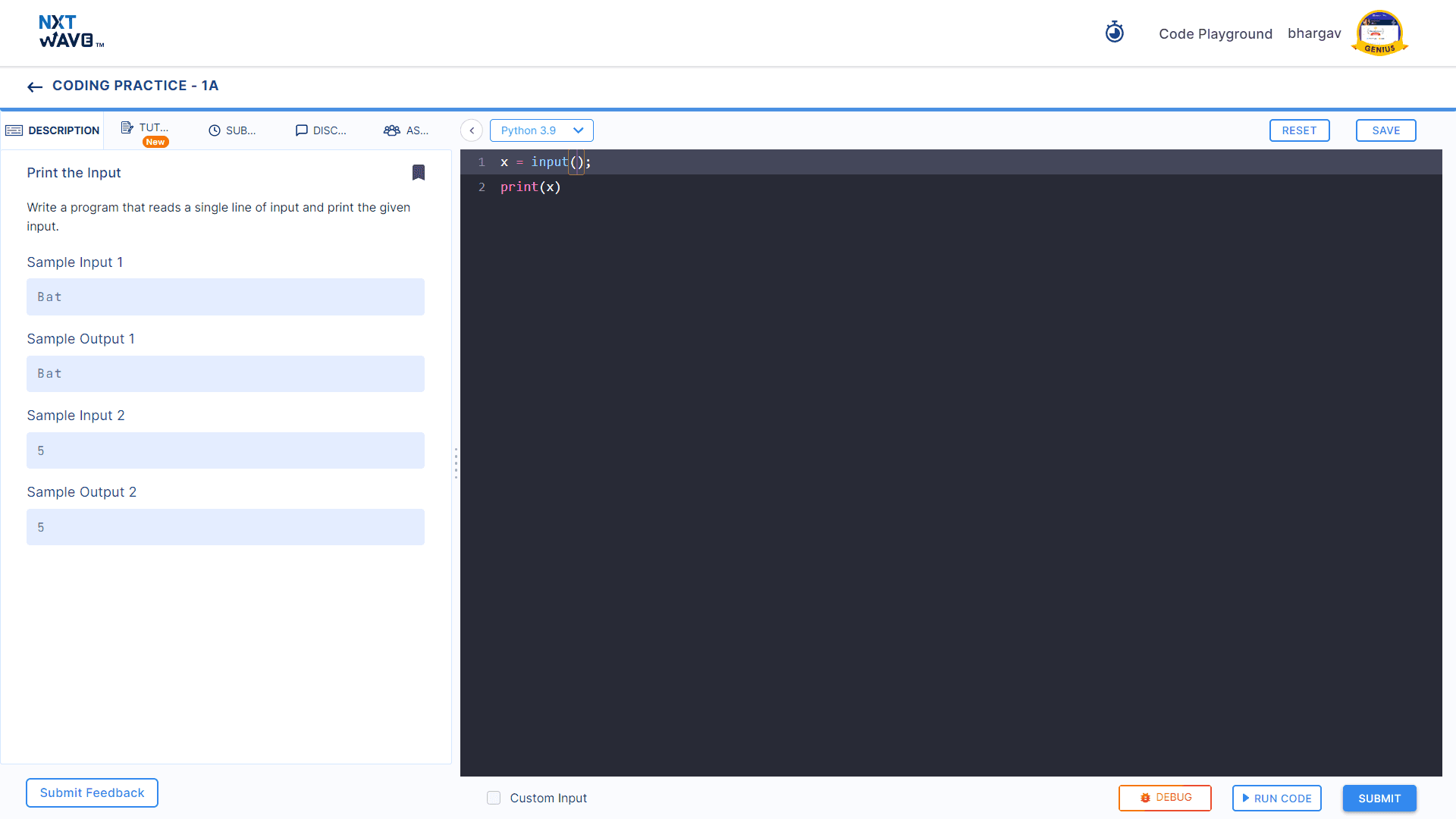

Before → After → Impact
Tutorial Over-Dependency
Why Do Students Do This?
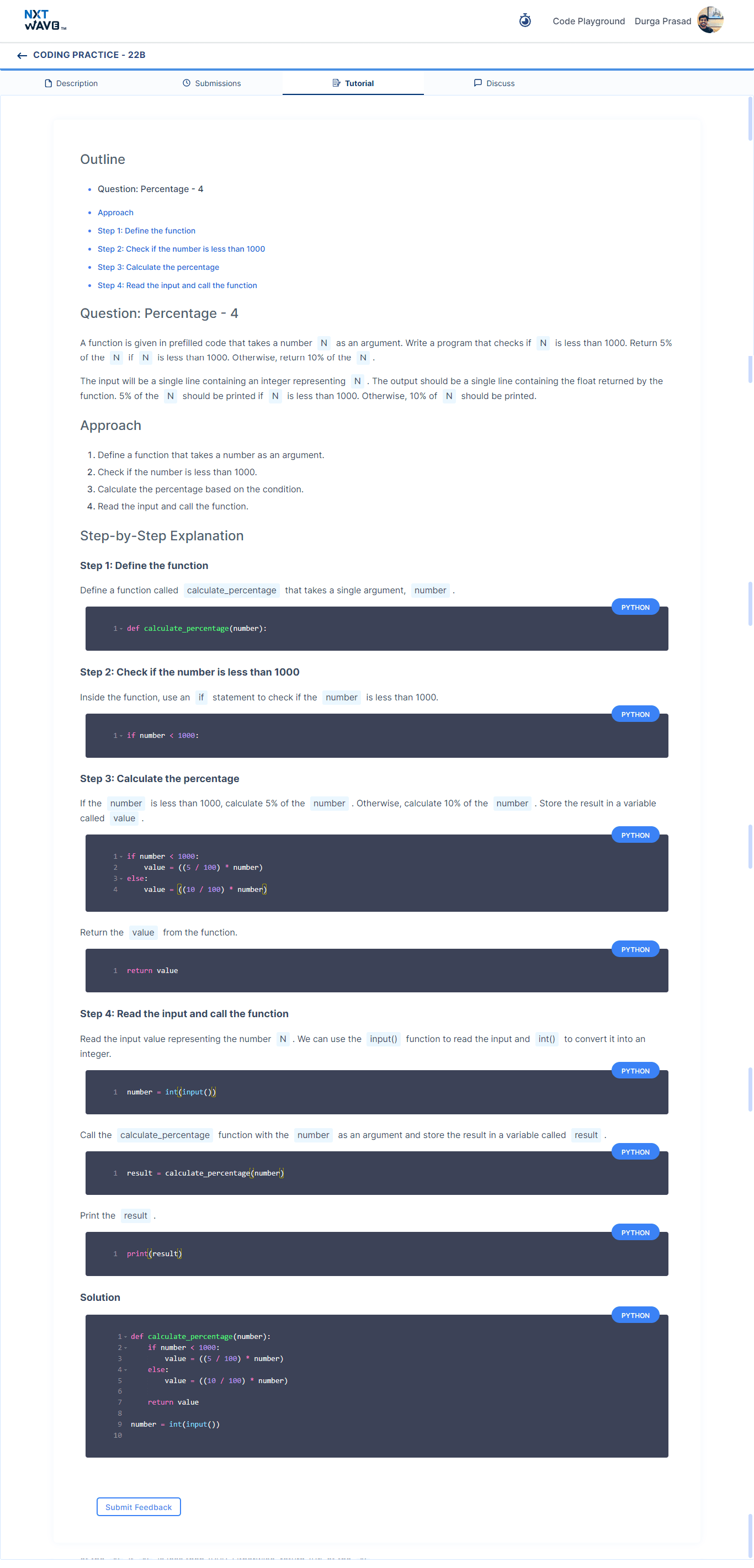
Students has to discuss when they have doubts. Increase in discussion response time decreases the curiosity to solve a question. This leads them to access solutions directly. By understanding the current structure
Our tutorial content is structured into three key parts:
Approach: This section outlines the basic steps the user needs to take to solve the problem.
Step-by-Step Explanation: Here, we provide a detailed, step-by-step breakdown of the solution, including relevant code snippets.
Solution: Finally, this section presents the complete code that the user needs to implement to solve the problem.
The solution
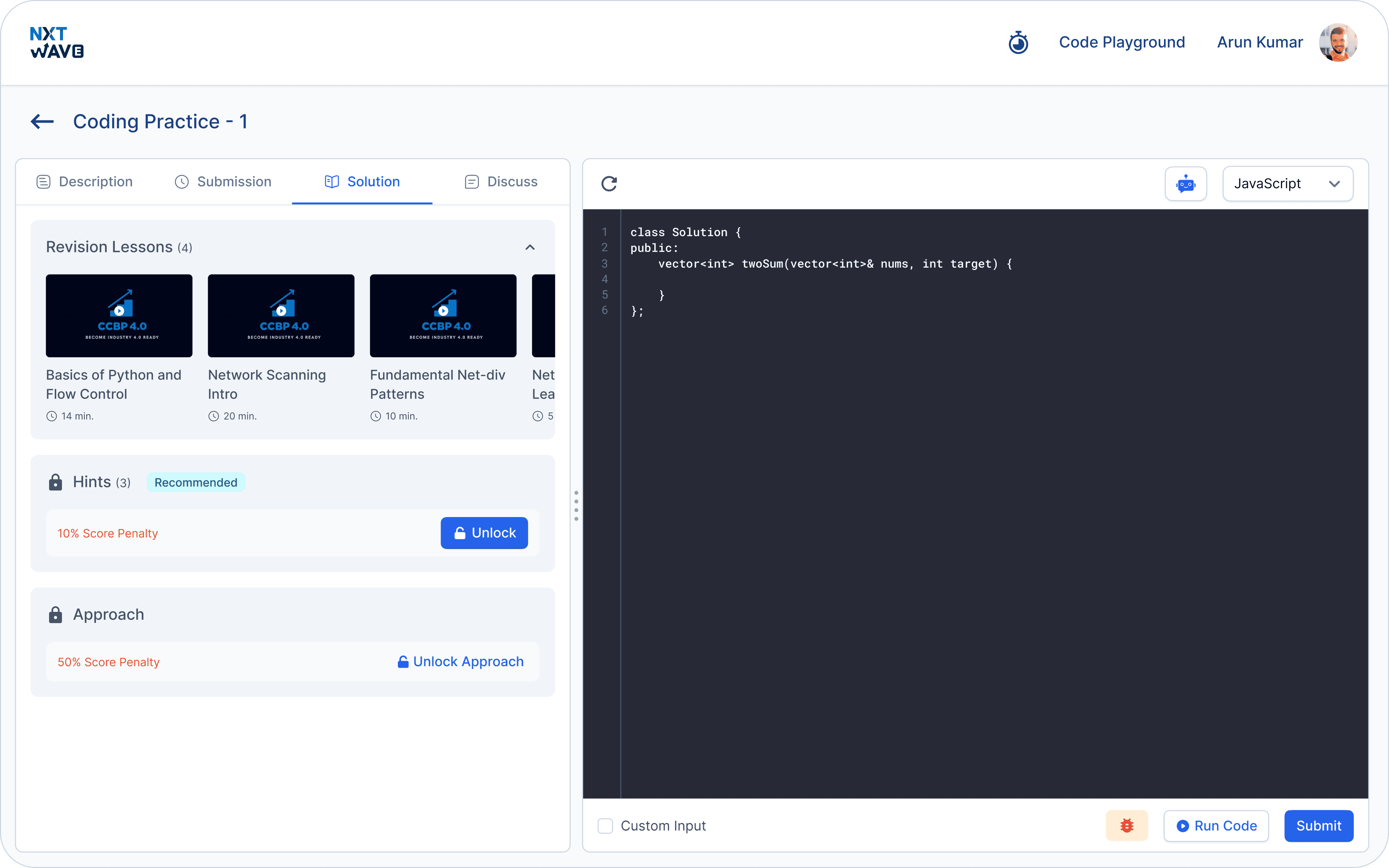
NxtWave assigns a score for each question students solve, but these scores currently lack meaningful utilization within the portal. To address this, I decided to introduce a step-by-step unlocking process for our solution content.
Step 1
When users encounter difficulties in solving a problem, they typically navigate to the solution tab, where they can access lessons to guide them through the problem-solving process.
Step 2
After watching those videos, if a user is still unable to solve the questions, they have the option to unlock the hints section, which comes with a penalty of deducting 10% from their score.
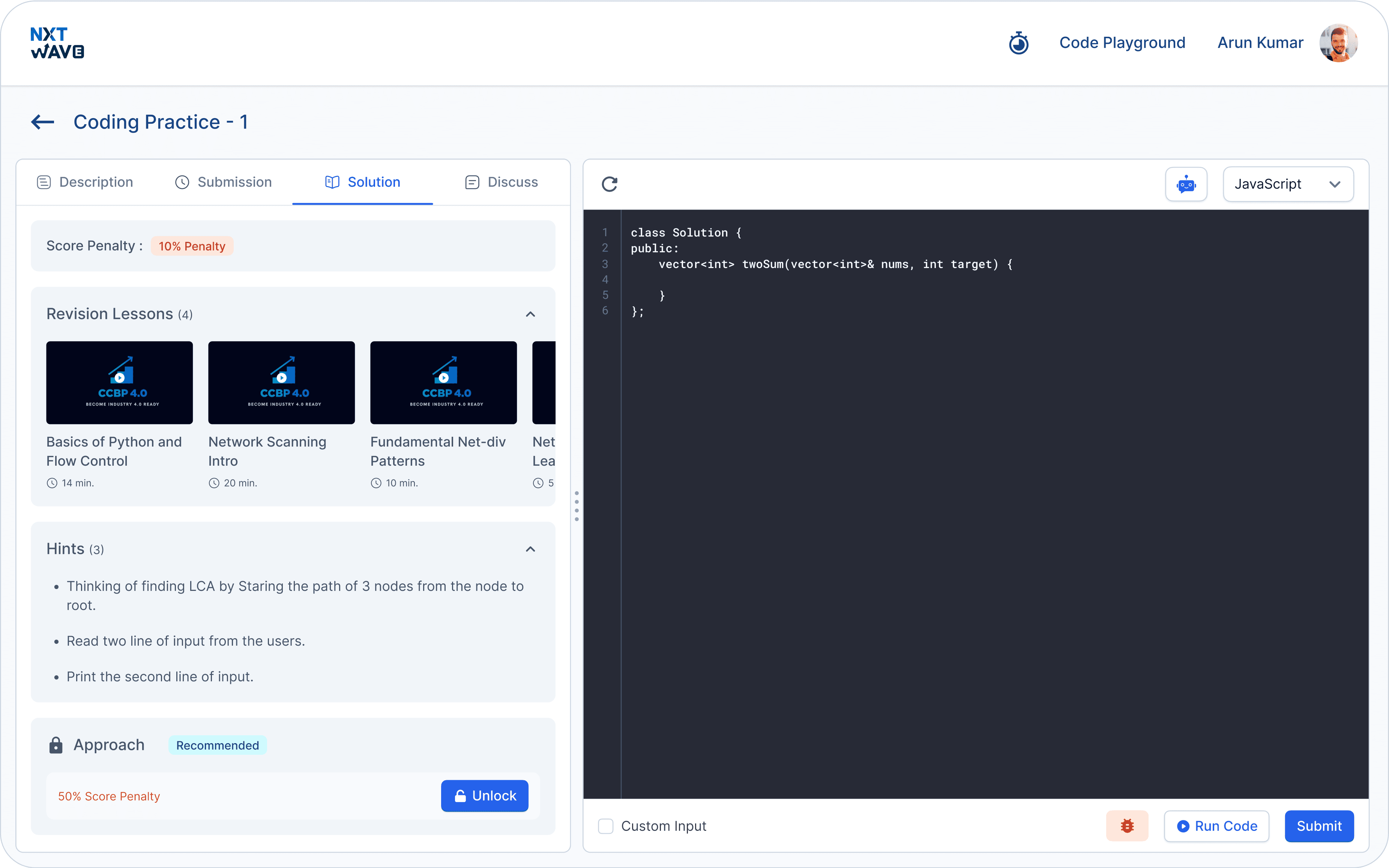
Step 3
The last and final step is when a user is completely stuck on a question. At this point, they can unlock the "Approach" section, which offers two tabs. Explanation and code. To access this section, users must accept a penalty of 50% of their score.


Rationale for the Section Arrangement
The main reasoning behind the arrangement starting with revision lessons, followed by hints, and finally the approach is to guide users from the hardest step to the easiest. I encourage them to first review the lessons and grasp the concepts, then unlock hints if needed, and as a last resort, access the approach section for the complete solution.
Open revision lessons
Hints
Approach
REFLECTION
Overall Impact
Our redesign of the Coding Practice Platform has yielded positive results for both our business objectives and user experience.
Since the release of this version, we have noticed a substantial rise in the number of students attempting questions independently, without needing to unlock the Approach section.
The percentage of doubts in our discussion forums has decreased significantly, demonstrating the effectiveness of our AI bot in resolving student queries.
Furthermore, the feedback we've received indicates an increase in our coding Practice Platform's ratings, suggesting that we have successfully addressed usability issues to some extent.
In conclusion, the changes we've made seem to be generating positive outcomes, and we continue to strive for improvement.
What I Learned
User Empowerment: The redesign has effectively empowered students to attempt solving questions independently, indicating that providing clear guidance and structured support can boost users' confidence and autonomy.
AI Assistance: The significant decrease in discussion forum doubts suggests that integrating AI-driven solutions can effectively reduce the need for human intervention, improving response times and overall user satisfaction.
Usability Matters: The increase in platform ratings highlights the importance of addressing usability issues. Even small improvements in user experience can lead to greater user satisfaction and positive feedback.
Continuous Improvement: The positive outcomes demonstrate that iterative enhancements and responsiveness to user needs are essential for maintaining a successful platform.
Business and User Alignment: The alignment of business objectives with user experience improvements has proven beneficial, showing that a well-designed product can drive both user engagement and business success.